A simple habit tracker: one tap a day, nothing else
Once is a simple habit tracker for iPhone. You add a habit, then tap it once a day to check it off, and a streak counts the days. There’s no account to create, nothing to type when you check off, and no feed to scroll. A missed day can be repaired instead of resetting your streak.
What Once does
- One tap to check off a habit
- A streak for every habit
- Repair days for a missed day
- A reminder at any time you pick
- A weekly overview of how you did
What it leaves out
- An account or sign-up
- A subscription
- Ads
- Friends, feeds or leaderboards
- Anything to type when you check off
Why a simple habit tracker works better
A habit tracker is only useful if you open it every day. Every extra step, like a note to write, a mood to rate or a number to enter, is one more reason to skip it on a busy evening. Once a tracker becomes a chore, the habits go with it.
A simple tracker asks one question per habit: did you do it today? Answering takes a second, so the tracking never becomes the hard part.
What to look for in a minimalist habit tracker
Check-offs that take one tap, a streak you can see at a glance, and reminders you set yourself. That covers what most people need every day.
Just as important is what happens on a bad day. A tracker that wipes a long streak after a single miss is simple in the wrong way: it turns one slip into a reason to quit.
How to set up a habit in Once
Add a habit.
Give it a name and an icon. That’s the only required step.Choose the days.
Every day, or only the days it applies, such as weekdays for a work habit.Set a reminder if you want one.
Pick any time. Reminders are scheduled on your phone.Tap once a day.
Check it off on the Today screen and watch the streak grow.
An easy habit tracker that still shows your progress
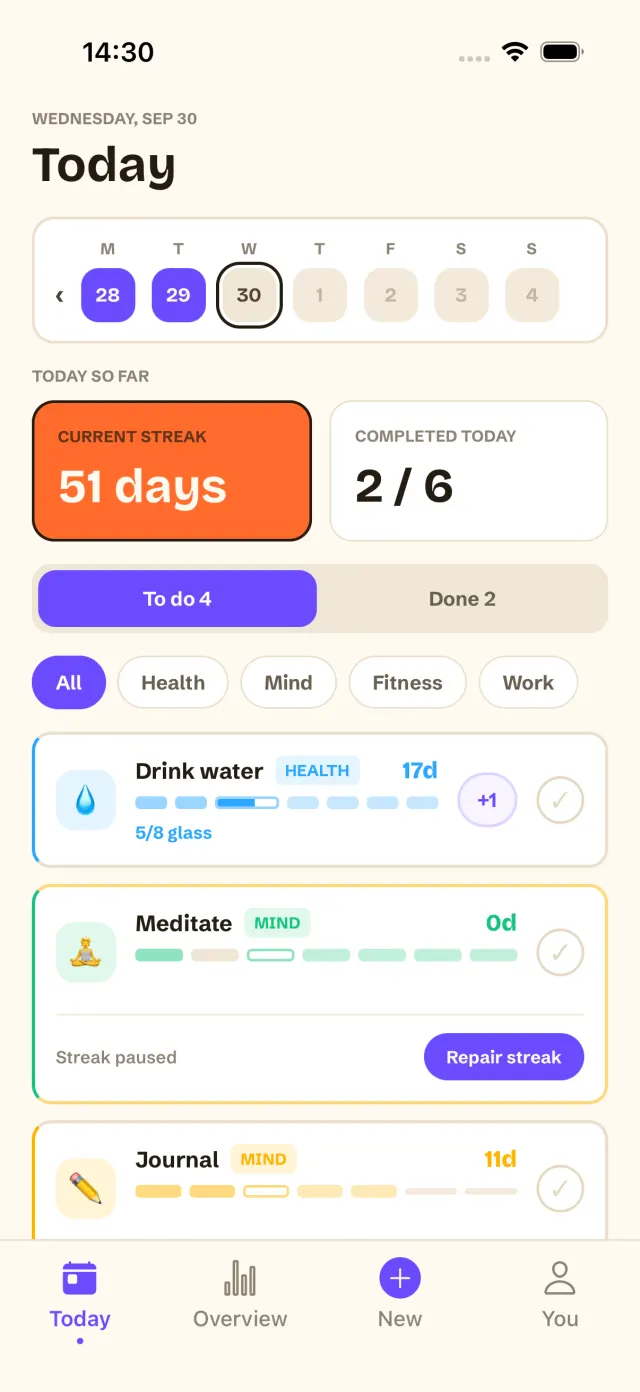
Simple doesn’t mean blind. Each habit shows its current and best streak and its last 30 days, and the weekly overview shows how the whole week went. Achievements mark milestones from a 3-day streak to a full year.
If you want more, Once Unlimited adds a Month view and a Year heatmap. It’s a one-time purchase, and the free plan covers up to 3 habits without it.
In the app
What a day in Once looks like
Open the app and the Today screen lists every habit due today, with its streak beside it. Tap a habit to check it off. Habits you do several times a day, like glasses of water, fill up one tap at a time.
Forgot to log yesterday? Fill in the day. Really missed it? Spend a repair day and the streak carries on. Your habits stay on your iPhone, with no account.
Download on the App StoreQuestions
What is the simplest habit tracker for iPhone?
Look for one tap per check-off, no account and no extra fields to fill in. Once works this way: you add a habit and tap it once a day.
Do I need an account to use Once?
No. There is no sign-up of any kind. You open the app and add a habit.
Is Once free?
Yes, for up to 3 habits, including streaks, repair days, reminders and the weekly overview. Once Unlimited is a one-time purchase for more habits and the Month and Year views.
Can I track a habit only on some days?
Yes. Each habit has its own repeat days, and a day it isn’t due never breaks its streak.
Keep reading